Google Sheets Functions
Convert performances into World Athletics points directly in your spreadsheet
What this script does
This script adds three formulas to your Google Sheets - WA_VERSION, WA_SCORE and WA_MARK - to convert any athletics performance into World Athletics points, or the other way around. It lets you compare results across disciplines, athletes or rivals directly in your spreadsheet, without leaving Sheets or doing the maths by hand.
How to Use the Formulas
This video shows you how to write the WA_SCORE formula to convert a performance into points. Remember that every formula in Google Sheets always starts with the = sign.
You can also type the text directly instead of selecting a cell - for example, instead of linking to the cell containing "Women", you can simply type "Women", in quotes and separated by commas.
WA_SCORE(gender, event, mark)Installation
Follow these steps to install the script. If you'd rather watch, the full video walkthrough is below. If you get stuck or run into an error, contact me and we'll help you out.
- Open your Google Sheet and go to Extensions → Apps Script.
- Delete the sample content in the
Code.gsfile. - Paste the script you downloaded after purchase.
- Save the changes, wait for it to finish saving, then close the Apps Script editor.
- Reload your spreadsheet. You'll see a new menu called WA 2025 in the top bar.
- Use any of the formulas in a cell. The first time, Google will ask for authorisation - click Allow to activate them.
Why does it ask for permission? ➔ The first time you run any custom script in Google Sheets - ours or anyone else's - Google always shows this authorisation screen. It isn't a warning that something is wrong: it's the standard process for any new function running in your spreadsheet, and it will only ask once.
Available Functions
These are the three formulas the script adds to your spreadsheet. Use them as many times as you like, in as many sheets as you need.
| Function | Description |
|---|---|
=WA_VERSION() | Returns the version of the installed tables. |
=WA_SCORE(gender, event, mark) | Converts a performance into World Athletics points. |
=WA_MARK(gender, event, score) | Converts World Athletics points into the equivalent performance. |
Remember: every formula starts with =, and each value can be written as quoted text or by selecting a cell in your sheet.
Customise the Names
From the WA 2025 → Configure Aliases menu, you can replace identifiers like m, w or HJ with the names you already use in your sheet. Set it up once and use those names directly in your formulas.
Important ➔ This table tells you what each identifier means, but it doesn't set anything up on its own. To use, for example, "High Jump" instead of HJ in your formulas, you still need to open the configuration dialog and save it as an alias - simply knowing the meaning doesn't activate it automatically. On top of that, an original identifier (such as HJ) can never be reused as a custom alias for any other event: it can only ever keep its own original meaning.
Gender
| Identifier | Meaning |
|---|---|
m | Men |
w | Women |
x | Mixed |
Field Events
| Identifier | Meaning |
|---|---|
HJ | High Jump |
PV | Pole Vault |
LJ | Long Jump |
TJ | Triple Jump |
SP | Shot Put |
DT | Discus Throw |
HT | Hammer Throw |
JT | Javelin Throw |
Common Suffixes and Prefixes
| Pattern | Meaning |
|---|---|
H (e.g. 110mH) | Hurdles |
SC (e.g. 3000mSC) | Steeplechase |
W (e.g. 20km W) | Race Walk |
4x (e.g. 4x400m) | Relay |
sh (e.g. 1500m sh) | Indoor version |
Sprint, middle-distance, long-distance and road events (100m, 5km, Marathon...) already have a clear name and don't need an extra alias. If you're unsure about a specific event, contact me and we'll confirm it for you.
Import and Export
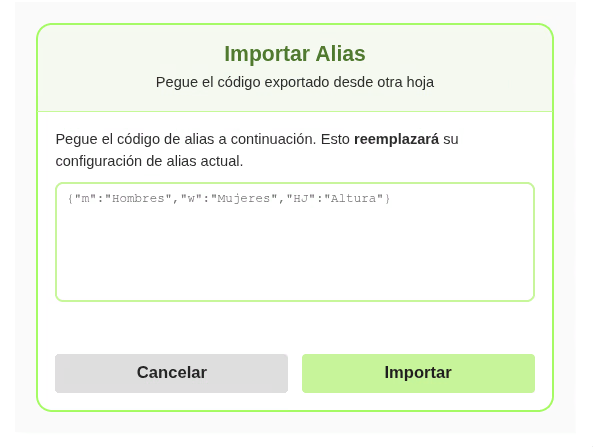
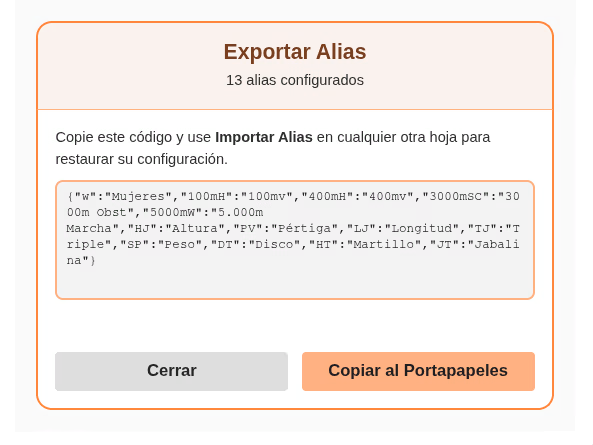
If you use more than one file, you can insert the script into each one in the same way. Additionally, these two extra features allow you to import and export previously configured aliases, so you don't have to repeat the process every time.
Frequently Asked Questions
Do I need to know how to code to use the formulas?
No. You only need to copy and paste the script once, following the installation steps. After that, the formulas work just like any native Google Sheets function - you'll never need to touch the code again.
Does it also work in Excel?
This version is for Google Sheets only. We'll be launching an equivalent version for Excel soon - but, since they're different platforms, the scripts won't be compatible with each other.
Is there a limit on how many times I can use the formulas?
No. Once the script is installed, you can use the formulas as many times as you like, across as many sheets and cells as you need, with no extra cost or usage limit.
What happens when World Athletics publishes new tables?
This script uses the 2025 tables and always will. World Athletics updates its scoring tables infrequently (usually every few years), and when a new version is published, we'll release an update as a separate, independent product.
Do I need an internet connection for it to work?
No. The scoring tables are built directly into the script, so the formulas work without relying on any internet connection or external servers - once installed, it's entirely yours.
Get Started
Have a question about the formulas, whether they fit your project, or anything else? contact me and we'll help.
Google Sheets Functions